


4K Display Motherboards for Ultra-HD Digital Signage: 5 Facts You Should Know
You want your digital signage to look clear and work well. You also want it to last a long time. When you look for 4k display motherboards for ultra-hd digital signage, you see many options. Not every motherboard can work with ultra-HD screens and lots of content.
Experts say you should think about more than just cost. Look at the type of content, how much work it will do, and where you will put your display. Will it show pictures, videos, or moving images? Is your area dusty or hot?
Here is a simple table to help you choose:
| Criteria | Description |
|---|---|
| Content Type and Workload | Will your display show images, videos, or animations? |
| Installation Environment | Is your signage indoors, outdoors, dusty, or hot? |
| Software Ecosystem | Can your motherboard work with your content management system? |
| Budget and Lifecycle | Will this solution last and get updates? |
4k display motherboards for ultra-hd digital signage cost more than ones with lower resolution. But they give you very clear pictures and cool features. Most companies now use 4K for their signs, so picking the right motherboard is important. Products like ShiMeta’s AIBOX-3588M show how much technology has improved. You need a motherboard that works for you now and can still help you later.
Key Takeaways
- Pick a motherboard with native 4K output for clear images. This helps your digital signage look neat and interesting.
- Make sure your motherboard has many ways to connect, like HDMI and DisplayPort. This lets you hook up different screens and devices without trouble.
- Get a motherboard with a strong processor for smooth video play. A good CPU and GPU stop lag and make things work better.
- Choose industrial-grade motherboards that are dustproof and shockproof. These features help your signage last longer in hard places.
- Find motherboards that let you upgrade RAM and storage easily. This keeps your signage system up-to-date and ready for new content.
Native 4K Output & Display Support
4K Ultra HD Digital Signage Motherboard Features
If you want your 4k digital sign to look great, you need a motherboard that can show native 4k. Native 4k has four times more detail than Full HD. Pictures look much clearer and more real. People will see the difference right away. Good images make your brand look new and professional. With a high-definition motherboard, you can show every small part of your content.
Here are some things to look for in a 4k ultra hd digital signage motherboard:
- Native 4k lets you see everything clearly.
- HDMI and DisplayPort make it easy to connect screens.
- It works well for smooth videos and pictures.
- It is built to last as technology gets better.
Native 4k is different from upscaled 4k. Upscaled 4k tries to make lower quality pictures look better. Native 4k starts with real 4k pictures, so you get perfect pixels and top quality.
Tip: Always make sure your motherboard can do native 4k, not just upscaled 4k. This helps you get sharp and clear images.
Here’s a quick comparison:
| Feature | Native 4K | Upscaled 4K |
|---|---|---|
| Resolution Source | Real 3840×2160 or 4096×2160 | Lower resolution, upscaled |
| Clarity | Maximum detail | Less detail than native 4k |
| Pixel Accuracy | True 4k pixels | Interpolated pixels |
| Quality | Superior | Smoother, but not as sharp |
Verifying 4K and 8K Compatibility
You want your 4k sign to work with new screens. Some motherboards only go up to 4k, but the ShiMeta AIBOX-3588M can do even more. It supports 8k at 60Hz with HDMI 2.1, and 4k at 60Hz with DisplayPort 1.4. This means you can use the newest screens and show very clear pictures.
| Motherboard Model | Supported Resolution | Refresh Rate |
|---|---|---|
| ShiMeta AIBOX-3588M | 8K | 60Hz |
| Other Motherboards | Up to 4K | Varies |
Not all hardware works with every screen. Many people forget to check if things match before installing. You should always check first to make sure your motherboard fits your screen and content.
If you want your 4k sign to last, choose a motherboard that works with many screens and has smart features. The ShiMeta AIBOX-3588M lets you upgrade your sign as new tech comes out.
Connectivity & Multi-Display Options
HDMI, DisplayPort, and USB Interfaces
When you set up digital signage hardware, you want it to work with lots of screens. Good connections make things easier for you. You can hook up your 4k display to TVs, monitors, or projectors. HDMI and DisplayPort are the most common choices for 4k digital signage hardware. HDMI gives you clear video and sound. DisplayPort lets you use more than one screen from one port. USB ports help you add things like cameras, touch screens, or extra storage.
Here’s a quick look at the main interfaces you’ll use:
| Interface | Key Features | Use Cases |
|---|---|---|
| HDMI | Supports 4K at 60Hz and 120Hz, high bandwidth. | TVs, digital signage, monitors |
| DisplayPort | Handles 4K at 120Hz with HDR, multiple displays from one port. | Workstations, multi-display setups |
| USB | Connects peripherals, easy expansion. | Cameras, touch screens, storage |
You want the best digital signage hardware to have all these choices. The ShiMeta AIBOX-3588M gives you HDMI IN/OUT, DisplayPort, and USB. You can connect almost anything you need for your signage project.
Driving Multiple Screens for 4K Digital Signage
Do you need more than one screen for your 4k signage? Many businesses want to show ads, menus, or info on several screens at once. The right digital signage hardware lets you do this easily. Some motherboards can run up to four 4k screens at the same time. You get smooth video and bright pictures on every screen.
| Display Configuration | Maximum Displays | Resolution | Refresh Rate |
|---|---|---|---|
| 4K 120Hz | 4 | 4K | 120Hz |
| 4K 240Hz | 2 | 4K | 240Hz |
| 8K 60Hz with DSC | 2 | 8K | 60Hz |
| Multi-monitor total | Up to 4 | 7680×4320 | 360Hz |
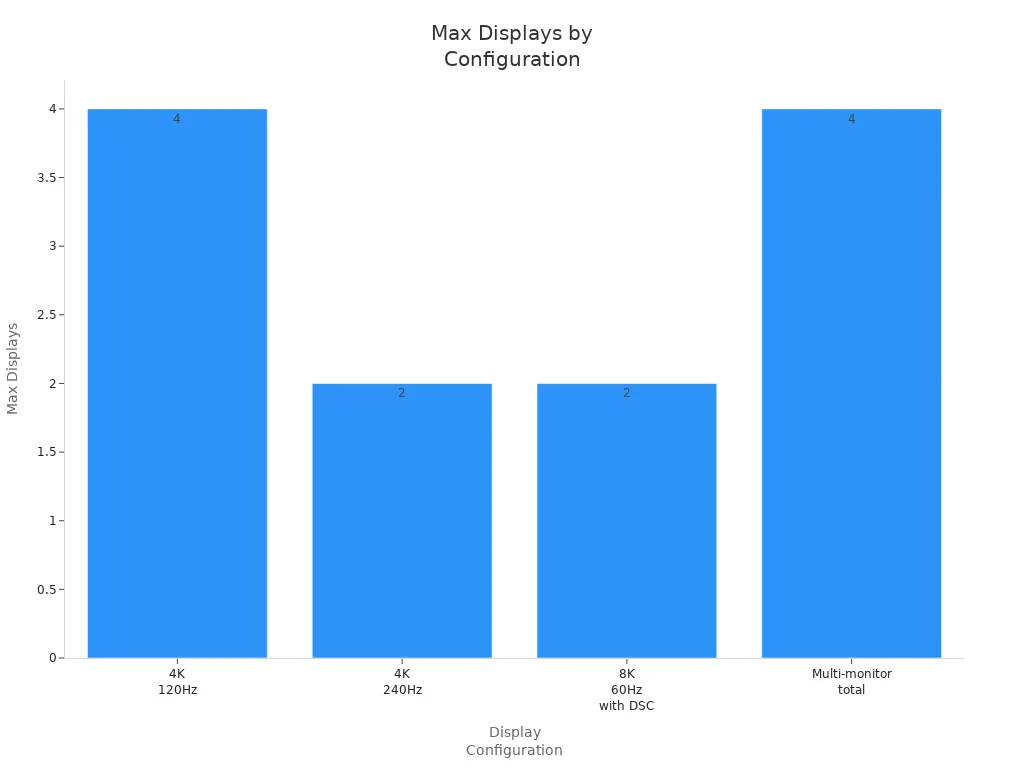
The ShiMeta AIBOX-3588M makes it easy to set up many screens. You get HDMI IN/OUT ports and support for 8K output at 60fps. You can run lots of screens for your signage and keep everything looking clear. USB ports let you add more devices if you want to grow your system.
Tip: Always check your digital signage hardware for enough ports and support for more than one screen. This helps you add more displays without changing your whole setup.
With the right connections, you can build the best digital signage hardware for your needs. You get flexibility, easy upgrades, and a system that works for any 4k signage project.
Processing Power & Performance
AI Engines and Quad-Core CPUs
You want your 4k signage to run smoothly, even with high-resolution content and lots of video. The processor inside your motherboard makes a huge difference. If you pick a weak processor, your video playback might stutter or freeze. For 4k ultra hd content, you need a strong CPU and GPU. Here’s a quick table to show what works best for 4k video:
| Component | Recommendation |
|---|---|
| GPU | GTX 1050 2GB |
| CPU | Pentium G4650 or i3 (or better) |
| RAM | Minimum 8GB |
The ShiMeta AIBOX-3588M uses the RK3588 platform, which gives you a powerful 4×Cortex-A76 and 4×Cortex-A55 processor setup. This means you get fast speeds and smooth video playback for all your signage needs. The RK3588 also has a 6 TOPS NPU, so you can run AI features like facial recognition or crowd analysis right on your signage. You don’t need extra hardware for smart features.
Note: AI engines help your signage do more than just show video. They let you target content, analyze viewers, and keep your system running fast.
Smooth Playback for 4K Digital Signage
You want your 4k display to show native 4k video playback without any lag. The right processor and GPU make sure your signage delivers top-notch picture quality every time. The AIBOX-3588M stands out with its 6T computing power, which beats many other boards. You get visual excellence and reliable performance, even with lots of video running at once.
Here’s what AI processing brings to your signage:
- It boosts video quality and keeps playback smooth.
- It supports smart features like behavior recognition.
- It lowers costs because you don’t need extra AI parts.
When you choose a motherboard with strong performance, you get better video, sharper images, and a display that always looks great. Your signage will handle 4k video, 4k ultra hd content, and even high-resolution content with ease. You can trust your system to deliver quality and keep your audience engaged.
Reliability & Industrial-Grade Durability
24/7 Operation and Thermal Management
You want your signage to work all the time. Many stores and companies need screens that never stop. If you choose a motherboard made for 24/7 use, you worry less. These motherboards last longer and do better in hard places. Industrial motherboards can work for five to seven years. Regular ones might only last one to three years. You will not need to replace them as often, so your signs keep working.
Here’s a table that shows what is important for strong 4k signage:
| Feature | Description |
|---|---|
| Extended Operational Life | Made for nonstop use, so it lasts longer in businesses. |
| Unwavering Reliability | Stays strong even when used all the time. |
| Harsh Environment Tolerance | Handles heat, humidity, dust, and shaking without problems. |
The ShiMeta AIBOX-3588M has smart cooling. It stays cool even in hot places. You do not have to worry about it getting too hot or turning off. Your 4k pictures will always look good and run smoothly.
Tip: Pick a motherboard with good cooling if your sign will be in busy or warm spots.
Dustproof, Shockproof, and High-Temp Resistance
Your sign might get dusty, bumped, or hot. You need a motherboard that can handle these things. Industrial boards are dustproof and shockproof. They also work in high heat. The AIBOX-3588M is great for this. It works in very cold or very hot places, from -40°C to 85°C. It keeps dust out and does not break if it gets shaken or hit. This makes it good for outdoor signs or factories.
Here’s a table about durability standards:
| Durability Standard | Description |
|---|---|
| Temperature Resistance | Works in very cold or hot places, from -40°C to 85°C. |
| Shock and Vibration Resistance | Does not break if it gets hit or shaken. |
| Dust and Debris Protection | Keeps dust out, so it works well outside. |
- Your 4k sign will work anywhere.
- You will not have to fix it often.
- You can trust your sign to keep working, no matter what.
If you want your sign to last, pick a motherboard that is tough. Your 4k screen will stay bright and clear, even in hard places.
Expandability & Future-Proofing
RAM, Storage, and OS Compatibility
You want your signage to keep up with new technology. That means you need a motherboard that lets you upgrade RAM and storage. More RAM helps your system run many apps at once. Fast storage, like NVMe SSDs, makes your signage load videos and pictures quickly. If you use 4K content, these upgrades matter even more.
Here’s a quick look at common RAM options for 4K display motherboards:
| RAM Capacity | Speed (MT/s) | Performance Benefit |
|---|---|---|
| 16GB | 4800 | Good for basic 4K signage |
| 32GB | 6000 | Handles heavy video and multitasking |
| 32GB | 6400 | Fast app launches and smooth performance |
You can find top memory kits, like Corsair Vengeance DDR5, with speeds up to 8000MT/s. These give you room to grow as your signage needs change. Upgrading to NVMe SSDs also boosts speed for booting up, file transfers, and running apps. You get a smoother experience and your system lasts longer.
The ShiMeta AIBOX-3588M supports these upgrades. You can add more RAM or swap in faster storage. This keeps your signage ready for new content and bigger projects.
Flexible Design for Evolving Digital Signage Needs
You never know what you’ll need next year. Maybe you want to switch to a new content system or try a different operating system. Multi-OS compatibility gives you that freedom. The AIBOX-3588M works with Android and OpenHarmony. You can pick the system that fits your digital signage platforms best.
Here’s why multi-OS support matters:
- Flexibility: You can adapt to new tech without buying new hardware.
- No vendor lock-in: You’re not stuck with one provider.
- Future-ready: You can add new features or software as they come out.
A flexible motherboard design means you can add cameras, touch screens, or other devices. The AIBOX-3588M has lots of ports for expansion. You can grow your signage system as your business grows. You stay ahead of the curve and get the most from your investment.
Tip: Choose a motherboard that lets you upgrade and expand. Your signage will stay modern and powerful for years.
You want your signage to look clear and work well for years. There are five things you should know. Native 4K output gives you sharp images. Good connections help your screens work together. Strong processors keep everything running fast. Tough motherboards last longer in hard places. Easy upgrades let you add new features later. Always think about what you need most, like safety and dependability. Choose companies that have done a good job before. Use a checklist to help you pick the right signage. Products like ShiMeta’s AIBOX-3588M help you stay ahead. Take time to learn, compare choices, and ask experts for help.
FAQ
What makes a motherboard “4K ready” for digital signage?
A “4K ready” motherboard can show real 4K pictures. It has HDMI or DisplayPort so you can connect screens. It has enough power to play videos smoothly. You get clear images and it works well.
Can I connect more than one screen to my 4K signage motherboard?
Yes, you can use more than one screen. Many motherboards let you do this at the same time. You need enough HDMI or DisplayPort spots.
Tip: Always look at the specs to see if it supports more screens.
How do I know if my motherboard will last in tough environments?
Check for strong features like dustproof, shockproof, and heatproof.
| Feature | Benefit |
|---|---|
| Dustproof | Good for outside use |
| Shockproof | Handles hits and shakes |
| Heatproof | Works in hot places |
Can I upgrade RAM or storage on my digital signage motherboard?
Most motherboards let you add more RAM and storage. This makes your signage faster and able to show more things.
- Add RAM to do more at once
- Use SSDs to load things quickly
- Make sure it fits before you buy