


PCIe Explained: What It Is and the Different Types Compared
To meet the expansion needs of industrial applications, industrial PCs are equipped with PCIe slots. PCIe is a high-speed serial point-to-point dual-channel high-bandwidth transmission. Connected devices are allocated dedicated channel bandwidth and do not share bus bandwidth. It mainly supports active power management, error reporting, end-to-end reliable transmission, hot-plugging, and Quality of Service (QoS) functions.
What is motherboard with PCIe Slots?
Peripheral Component Interconnect Express, or CIe, is a high-speed interface standard used to link different internal computer system components. Expansion cards, such as graphics cards, network cards, and storage controllers, are mainly connected to the motherboard via PCIe.
The term “lanes” refers to the various sizes of PCIe slots on a motherboard. The number of data lanes available for communication is represented by common slot configurations, such as x1, x4, x8, and x16. Higher data transfer rates between the motherboard and the expansion card are typically the outcome of more lanes.
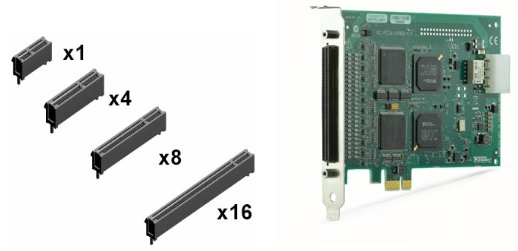
What is a PCIe lane?
A PCIe lane is a single data channel that serves as a conduit for data transmission and reception between an expansion card and the motherboard within a PCIe slot or connector. A collection of differential signal pairs (transmit and receive) that cooperate to send data is referred to as a “lane.”
The possible bandwidth for data transfer between the motherboard and the expansion card is determined by the number of PCIe lanes in a slot or connection. Higher data transfer speeds and improved performance are typically associated with more lanes. The several cables or traces that make up each PCIe lane are intended to reduce signal interference and preserve data integrity at high speeds.
Differences Between PCI-E x1/x4/x8/x16 Slots
I. PCIe x16 Slot
The PCIe x16 slot is primarily used for graphics cards and RAID array cards. This slot offers excellent compatibility, supporting backward compatibility with x1/x4/x8 devices. It can be considered the universal slot for PCI-E. PCIe x16 slots are commonly used for graphics cards, connecting directly to the central processing unit (CPU). Physically positioned close to the CPU, this arrangement minimizes data transfer latency between the graphics card and processor, allowing the system to achieve its full performance potential.
II. PCIe x8 Slot
For compatibility, PCIe x8 slots are typically manufactured in the form of PCIe x16 slots. However, only half of the data pins are functional, meaning the actual bandwidth is only half that of a genuine PCIe x16 slot. Observing the motherboard layout reveals that the rear half of the x8 slot lacks circuit connections, and in some cases, the pins are not even soldered.
III. PCIe x4 Slots
Similar to PCIe x8 slots, most PCIe x4 slots are now designed as PCIe x16 slots for compatibility purposes or expanded into M.2 interfaces. These serve to install M.2 SSDs, M.2 wireless network cards, or other M.2 interface devices. Other expansion cards are handled by PCIe x1 slots.
IV. PCIe x1 Slot
The PCIe x1 slot is the shortest at only 25mm. Compared to the PCIe x16 slot, its data pins are significantly reduced to just 14. The bandwidth for PCIe x1 slots is typically provided by the motherboard chipset. These slots are primarily used for standalone network cards, standalone sound cards, USB 3.0/3.1 expansion cards, and similar devices. In some cases, adapters can even be used to install graphics cards into PCIe x1 slots for mining operations or multi-display output.
| Bandwidth | Gigatransfer | Frequency | |
| PCIe 1.0 | 8 GB/s | 2.5 GT/s | 2.5 GHz |
| PCIe 2.0 | 16 GB/s | 5 GT/s | 5 GHz |
| PCIe 3.0 | 32 GB/s | 8 GT/s | 8 GHz |
| PCIe 4.0 | 64 GB/s | 16 GT/s | 16 GHz |
| PCIe 5.0 | 128 GB/s | 32 GT/s | 32 GHz |
| PCIe 6.0 | 256 GB/s | 64 GT/s | 32 GHz |
Conclusion
Building or upgrading a PC requires an understanding of PCIe slots and lanes. Understanding how to use PCIe slots efficiently will help you optimise your computer’s performance, whether you’re upgrading your system’s capabilities, installing a new graphics card, or adding storage. Keeping current with the most recent PCIe standards guarantees that you may fully utilise the newest high-performance components as technology develops.
When organising the construction or update of your system, take into account both the present needs of your components and the potential for future growth. The flexibility required for upcoming upgrades can be obtained by selecting a motherboard with the right quantity and arrangement of PCIe slots.
FAQ
Can I put a x8 card in a x16 slot?
A PCIe x1 card can fit into a PCIe x16 slot, but it will only use one lane’s worth of bandwidth. In a similar vein, a PCIe x8 card will function at half the maximum bandwidth of a PCIe x8 slot if it is placed in a PCIe x4 slot. For maximum performance, the majority of GPUs need a PCIe x16 slot, whereas M.2 SSDs need a PCIe x4 slot.
What is the difference between PCIe x1 x4 x8 x16?
‘PCIe x1’ connections have one data lane. ‘PCIe x4’ connections have four data lanes. ‘PCIe x8’ connections have eight data lanes. ‘PCIe x16’ connections have sixteen data lanes.
Is PCIe x16 or x8 better?
Most modern graphics cards are designed for PCIe x16 slots, as these provide the most bandwidth. However, some lower-end or older graphics cards may use x8 or even x4 slots. Additionally, while a card may physically fit in an x16 slot, it might not use all 16 lanes electrically.
Is PCIe x16 or x8 better?
Since PCIe x16 slots offer the highest bandwidth, the majority of contemporary graphics cards are made for them. On the other hand, x8 or even x4 slots may be used by some older or less powerful graphics cards. Furthermore, a card may not use all 16 electrical lanes even though it physically fits in an x16 slot.
Can I put a PCIe x8 card in a x4 slot?
Yes, the PCIe x8 expansion card (for example: QXG-10G2SF-CX4) can be installed in a PCIe x4 slot on a QNAP NAS, although the PCIe connection on the card is PCIe x8, bigger than the motherboard slot, it is still possible to connect and use it without hardware problem.