


Do you want a quick guide to the different types of motherboards? This article talks about the main differences between the Mini-ITX, Micro-ATX, ATX, and E-ATX motherboards. Not sure if you should get a Micro-ATX, Mini-ITX, or full-size ATX board? Or maybe you’re thinking about getting an Extended ATX? We’ll explain what makes each form factor different.
Choosing the right motherboard is one of the most important things to do when building a new PC. But not all motherboards are the same, so it’s important to know how the size of each one affects features, compatibility, and performance.
| Form Factor | Dimensions (mm) | RAM Slots | PCIe Slots | Typical Use Case |
| ATX | 305 x 244 | Up to 4 | Multiple | Gaming, Workstation |
| Micro-ATX | 244 x 244 | Up to 4 | Fewer | Budget Builds |
| Mini-ITX | 170 x 170 | Up to 2 | 1 | Compact PCs |
| E-ATX | 305 x 330 | Up to 8 | Multiple | Enthusiast Builds |
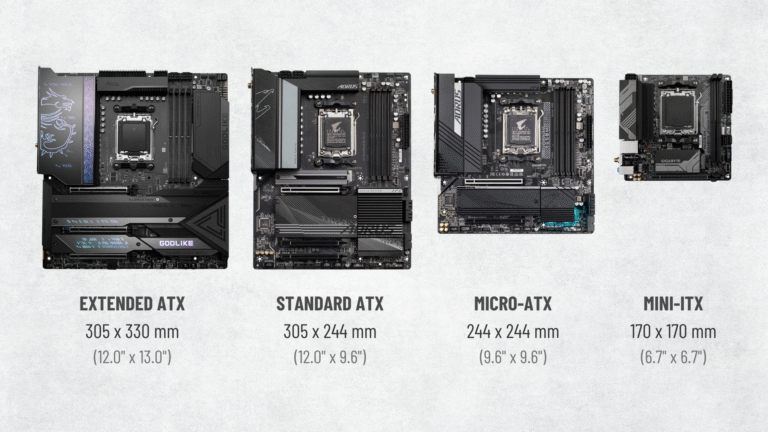
The main difference between micro-ATX (mATX), mini-ITX, standard ATX, and E-ATX motherboards is how big they are. Each size standard is meant to find a good balance between performance, expandability, and case compatibility.
Micro-ATX motherboards are the same width as ATX boards, but they are a little shorter. Standard ATX is bigger, so it has more PCIe slots. This makes it great for multi-GPU setups or people who need more than one expansion card.
The height and width of mini-ITX motherboards are both smaller than those of micro-ATX motherboards. They usually only have one PCIe slot, but their small size makes them great for small form factor (SFF) builds where saving space is important.
Extended ATX motherboards are the same height as ATX boards, but they are a few inches wider. This extra width gives manufacturers room to add more DIMM slots, ports, and heatsinks. But they need cases that are made to fit the bigger size.
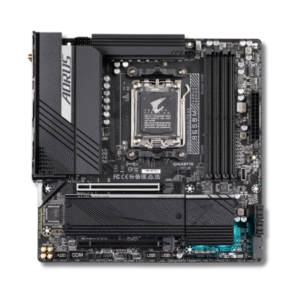
Micro-ATX PCs are now smaller towers than ATX PCs. You may use the same powerful processors, graphics cards, and memory kits in a smaller, lighter chassis.
Smaller and lighter chassis take up less desk or floor space and are more portable for LAN parties or transferring your PC.
Thus, Micro-ATX cases are great for individuals with limited space, but many also prefer their smaller size. It’s smaller than a full-size ATX case and can mix in with your other electronics and décor.
Perfectly engineered fans and heatsinks allow contemporary Micro ATX cases to cool well despite their tiny size. Little area to hide cables makes Micro ATX case cable management harder, but they’re cleaner.
With certain unique advantages, micro ATX PCs offer most of the benefits of current ATX PCs, but they can’t do everything.
Large, specialized water-cooling loops are challenging with Micro ATX PCs. Micro ATX cases can’t support multiple triple-fan radiators, however clever loops are conceivable. Larger air coolers may not fit with smaller MicroATX enclosures. Micro ATX PCs have inferior cooling potential. Powerful CPUs and GPUs can run in a Micro ATX PC, but cooling will be poor. Before choosing Micro ATX, make sure it can accommodate your PC’s components and cooling.
Without extra room, you’ll have fewer expansion card and hard drive alternatives. Fewer PCI-Express and SATA ports limit GPU, hard drive, and M.2 SSD connections and system space. MicroATX cases and motherboards are less popular than ATX, hence there are fewer options.
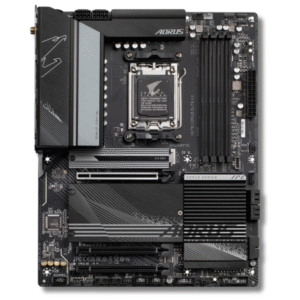
Larger motherboards support more hard drives and add-on cards.
Multiple graphics cards aren’t appealing anymore save for certain uses, however an ATX card may be the ideal size for you; it has enough space.
ATX motherboards are cheaper because to its easier manufacturing and offer more options for cooling systems and high-end components that can help with system overclocking.
Since ATX motherboards are the most prevalent PC form factor, manufacturers support them more. You have more aesthetic, feature, and performance options, making it easier to get a gaming PC that exceeds your expectations.
The M-ATX platform’s primary hardware distinction from ATX is the casing.
There is a significant drawback to take into account, even if an ATX PC has several benefits that make it a great option for anyone creating a new PC for business or play.
ATX chassis have more bulk. As a result, they often weigh more and occupy more room on your desk or floor, though this varies depending on the construction material and component selection.
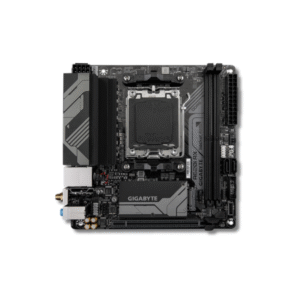
Mini-ITX is worth thinking about if you don’t mind giving up some expansion options for a small build and like the idea of a small, discreet PC. It is smaller than Micro-ATX and saves even more space.
The Mini-ITX motherboard is only 170 x 170 mm, which makes it the smallest standard form factor. But because it’s small, it has some limits: it only has two RAM slots, one PCIe x16 slot, one M.2 slot, and not many SATA or USB ports.
Mini-ITX boards often cost the same or more than ATX boards, even though they have fewer features. This is because it is harder to make them because they are smaller. Because they have shorter signal paths, they are also popular for overclocking memory.
Choosing the right case is very important for Mini-ITX builds because the cooling has to be just right to handle today’s high-performance parts in such a small space.
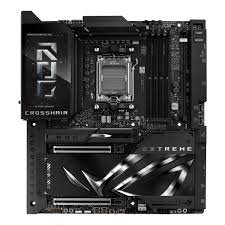
Pros: The greatest amount of expansion possible
Perfect for high-end GPUs, storage, and RAM
state-of-the-art capabilities such as enhanced VRMs and cooling assistance
Cons: The greater size necessitates the use of larger protective casings.
A higher price point
For easier construction, it is possible to leave blank space vacant.
In 2025, there will be a wide range of motherboard sizes available, so any builder will be able to find the right one for their needs. Knowing the pros and cons of each form factor can help you choose the best one for your next computer build, whether you want to make a powerful gaming rig or a sleek, hidden media center. You can start to think about your options now that you know how big the motherboard needs to be.
Yes, EATX cases usually support ATX motherboards due to their smaller size.
Yes, as smaller form-factor motherboards use the same mounting hole patterns as bigger form-factor motherboards, any smaller form-factor motherboard can fit inside a larger form-factor case, just like mini-ITX motherboards do.
While motherboards don’t directly affect system performance, they do determine the components you can employ. Thus, choosing a mini-ITX motherboard over a standard-ATX motherboard may result in inferior performance.
Mini-ITX motherboards can’t have as powerful power designs as conventional ATX or extended ATX motherboards because to their smaller size. Even a mini-ITX motherboard with a high-end chipset may not support an extreme processor.
The mini-ITX form factor’s only true benefit is that it makes it possible to create a very small system. Micro-ATX motherboards are more reasonably priced, however conventional ATX and extended ATX motherboards will always have a higher feature set.
EATX offers more expansion options and advanced features but is only “better” if your build requires them.


