


A single circuit board (PCB) that houses an entire computer system is called a single board computer (SBC). An SBC’s motherboard, CPU, and memory are all integrated into a single board, in contrast to conventional desktop computers, which depend on distinct parts. Because of their compact integration of the CPU, memory, input/output operations, and other essential components, SBCs are small, affordable, and multipurpose.
SBCs are widely used in many different applications, such as embedded computer controllers, instructional tools, and research or demonstration systems.
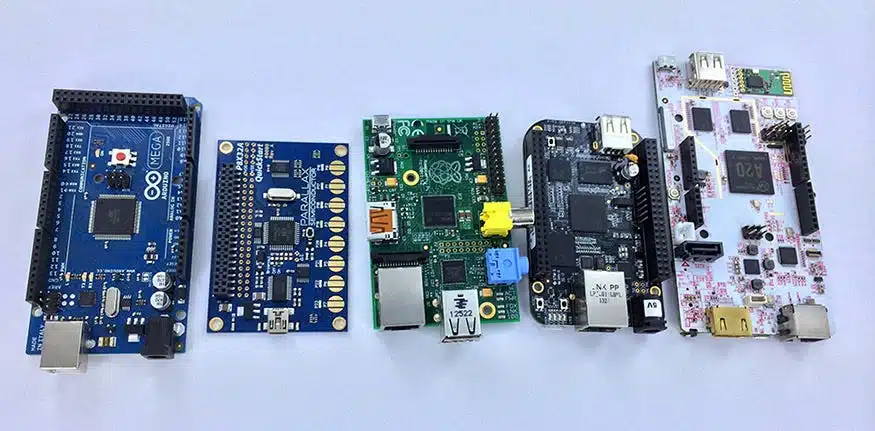
SBCs are well-liked because of their versatility, efficiency, portability, and community support. They are perfect for a variety of tasks since they provide computing solutions that are both economical and space-efficient. Media centers, embedded systems, Internet of Things devices, instructional tools, prototyping, and more are examples of applications.
SBCs are available in a variety of forms to meet various requirements and uses. Every variety offers distinct qualities and capacities:
1. Low-Cost SBCs
These boards—like the Raspberry Pi—are intended for small-scale developers, students, and hobbyists. They are reasonably priced and offer adequate performance for simple jobs like media streaming, programming, and small-scale Internet of Things initiatives.
2. Industrial SBCs
Designed for process control and industrial automation, these SBCs are dependable, durable, and able to tolerate challenging conditions. For smooth operation in factories and other demanding environments, they incorporate connections, RAM, and cutting-edge security measures.
3. IoT-Ready SBCs
These are tailored for Internet of Things and edge computing applications. They facilitate integration with a range of IoT systems and devices by supporting Bluetooth and wireless communication.
4. Multimedia SBCs
These boards, which include sophisticated audio and video outputs, are utilized in gaming platforms, home theaters, and digital signage. Peripherals for improved multimedia experiences are among them.
5. Customizable SBCs
These boards are intended for developers that require both software and hardware flexibility. Because of their modular components, users can customize the board for certain uses, including robotic control systems or slot machines.
By being aware of these kinds, users can choose an SBC for edge computing, industrial automation, or personal projects that best suits their requirements.
One essential feature is their small size, which makes it easy to incorporate them into already-existing machinery.
Additionally, industrial SBC computers are frequently strengthened to withstand shocks, vibrations, and high temperatures, making them ideal for use in sectors like the military, automotive, and aerospace industries.
Furthermore, a lot of industrial SBC computers have a high temperature tolerance, which makes it possible for them to be used successfully in harsh or outdoor settings.
Last but not least, the majority of industrial SBC computers have Ethernet and USB host connections, which make it easier to integrate them into industrial networks.
As a result, industrial SBCs offer a robust and adaptable solution for a wide range of industrial uses.
Advantages
1. Transportable and Compact: SBCs are easily integrated into projects with limited space because of their modest size.
2. Low Power Usage: SBCs are appropriate for embedded or battery-powered applications because they were designed with energy efficiency in mind.
3. Versatility: Media centers, Internet of Things devices, and instructional tools are just a few of the many uses for SBCs.
4. Community Support: A lot of SBCs have a sizable and vibrant user, developer, and enthusiast community that offers thorough documentation, tutorials, and support.
Disadvantages
1. Learning Curve: Technical expertise may be necessary while working with SBCs.
experience with hardware creation, among other abilities that may be difficult for novices or non-technical users.
2. Limited Expandability: SBCs’ scalability for some applications may be constrained by their compact design, which limits their ability to add more hardware components.
3. Lack of Standardization: Selecting the best SBC model for a particular project can be challenging because to the variety of models available, each having unique specs, form factors, and interfaces.
4. Performance Restrictions: SBCs may perform worse on demanding tasks since they have fewer memory, computing power, and storage than traditional computers.
ARM and x86 are the two application processor architectures in which SBCs are commonly offered with SoCs. Only operating systems and programs made to run on the ARM instruction set are compatible with ARM processors. On the other hand, x86 processors are limited to running operating systems and programs that are made to work with the x86 instruction set.
Because Android was created and is still being developed for ARM processors, ARM SBCs are actually ideally suited to employing Android-based operating systems and apps. Almost any Linux distribution can be run on an ARM SBC, and many of them can even run real-time operating systems (RTOS). Because of its cost and versatility, ARM-based SoCs are now the most popular architecture in the SBC market.
x86 SBCs work well with Windows or Linux. In most cases, an x86 processor is the ideal choice if your SBC use case calls for Windows. Many Windows programs are incompatible with ARM systems, even though some ARM processors (and hence, some ARM SBCs) can theoretically run Windows.
There is no one right solution when it comes to the applications of single board computers; the possibilities are endless. Even while it might not be the ideal fit in terms of price or functionality, the same basic hardware setup could be utilized for anything from a basic command and control interface for a piece of equipment to a full desktop computer. SBCs could be used in the following situations, however these are by no means the only ones:
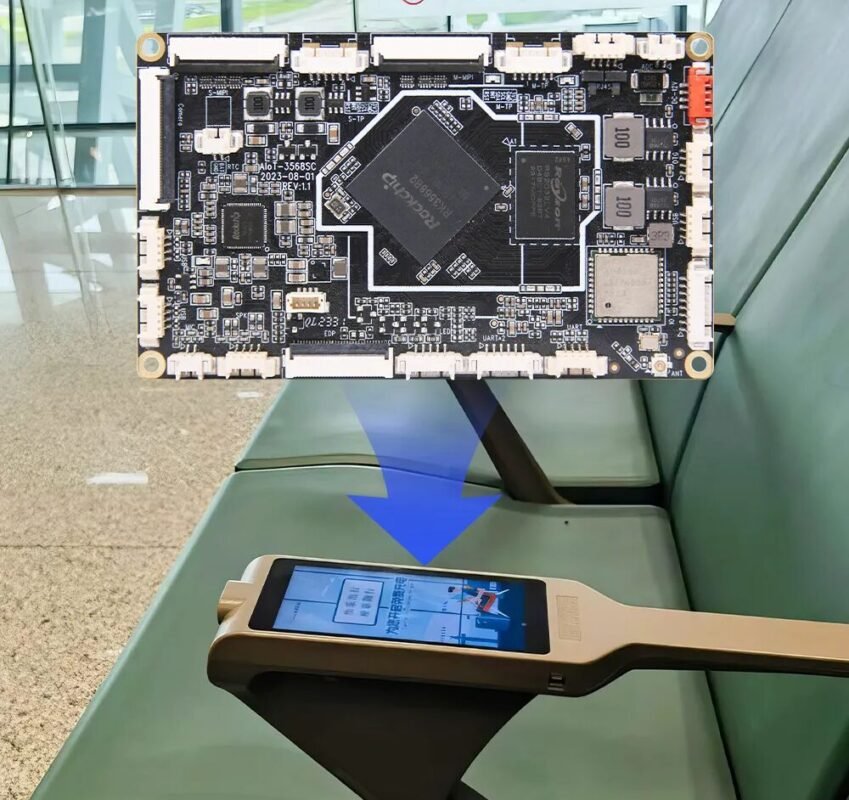
Understanding technical, performance, and environmental (e.g., size, isolation, heat) criteria is essential to selecting an appropriate SBC for your use case. Both literally and figuratively, not every SBC will be a good fit for every use case. Because of this, selecting the best SBC is a case-by-case process. specific single-board computer designs may be “make or break” depending on whether you need ethernet connectivity, are limited by a sealed enclosure, or need to maintain a specific level of performance.
It’s critical to thoroughly consider all available options when choosing the best SBC for hardware deployment at scale.


